Make a real website.
By the end you'll know the five moves that take a site from a blank page to something real — the way I actually built the Data Refinery Lab site for a TU Delft lab.
Start with the goal, not the page
Before I open an editor, I answer three questions. If you can't answer them in one sentence, the page isn't ready to build.
Name the one person who lands on it. For the lab: visitors, students, partners.
What should they understand or do? Not five things — one.
The real content, in real words — not filler.
For the lab site the answer was: the mission, the kinds of data, the process (acquire → clean → analyse → deploy), the projects, and contact. I wrote that content from day one with real words, and checked it in feedback rounds with the researchers who own it. Placeholder text ("lorem ipsum") just postpones every hard decision.
Build where you can move things
You don't need a complicated system to make something real. You need to see your own moves and be able to grab any block.
- Plain building blocks — ordinary HTML and CSS, nothing hidden, so you can move any part.
- Variants — try a second version of the page without touching the live one.
- Edit mode — flip a switch (
?edit=1) and tweak things right in the page.
You point, it moves. The page stays yours to shape — no black box.
Fill it with real content
Photos and video come from wherever you already have them — a slide deck, a shared drive. You put them on the page by their path: the address of where the file lives on your computer.
Copy the path
Right-click the file → "Copy as Pathname". Now you have its address.
Paste and place
Paste the path in, and the photo drops straight onto the page where you want it.
Compress what's heavy
Shrink big photos and video so the page keeps loading fast.
On the lab site, compressing took the page from ~17 MB to under 3 MB — it now loads in a blink. A slow page is a page nobody waits for.
Try things safely
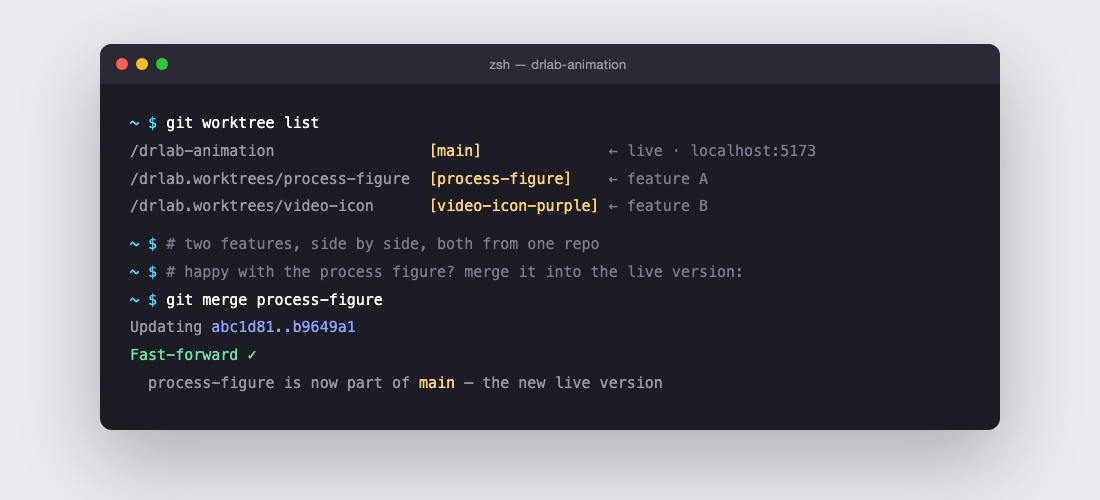
Once your site starts to become real, you want to dare to try things without breaking the good version. There are two tools for that.
A safe copy to try a change on. Like it, keep it; don't, throw it away — the live version stayed whole.
For a simple site, branches are plenty.That branch in its own folder, so you have two versions literally open side by side.
Only earns its keep when you juggle two big changes at once.Honest advice: learn branches first. There's a separate Worktrees module on the site for when you're ready for more.
Capture a way of working as a skill
When I do the same thing twice, I turn it into a skill — so the tool does it my way, every time.
Publishing the lab site used to be a whole string of commands. I taught it once. Now it's one word: deploy. That's how your own way of working becomes something you own, instead of something you re-figure-out every time.
You've made move 1 the moment you can say in one sentence who the page is for and what it must do. Everything else is just building.